Are you confused about when to click “Add New Post” versus “Add New Page” in your WordPress dashboard? You are not alone, but understanding the difference is the secret to building a truly professional website. While they may look similar at first glance, they serve completely different purposes for your content strategy.
The Core Difference: Dynamic vs. Static
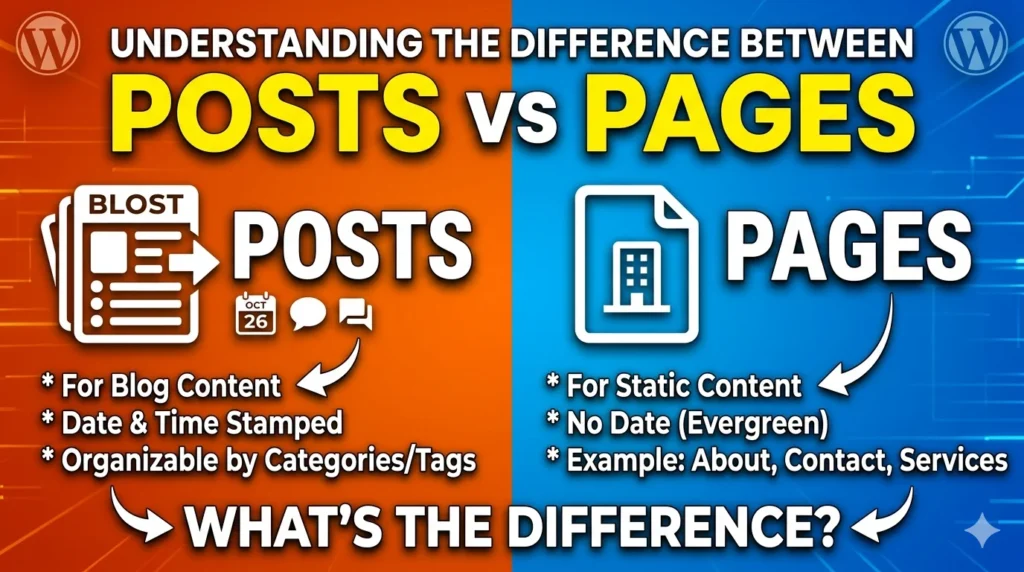
The easiest way to understand the two is through a simple analogy. Think of WordPress posts as your social media feed they are dynamic, constantly updated, and time-sensitive. Pages, on the other hand, are like the physical walls of your house they are static, timeless, and rarely change.
WordPress Posts: Your Website’s Dynamic Engine
Posts are designed for content that you update regularly. Here is what makes them unique:
- Reverse Chronological Order: Your newest content always stays at the very top of your feed.
- Organization Mastery: Posts use Categories and Tags to help readers find what they need. Think of categories as your website’s “Table of Contents” (e.g., Desserts) and tags as specific keywords describing the details (e.g., Chocolate or Cake).
- Key Features: Posts include options for featured images, drafting, and sketch grading to help you polish your stories.
- Best For: Blog articles, news updates, recipes, and reviews.
WordPress Pages: The Timeless Foundation
Pages are built for standalone, timeless information that doesn’t belong in a chronological feed.
- Navigation Focus: Pages are meant to live in your main navigation menu so visitors can always find them.
- Simple Structure: Unlike posts, pages do not use categories or tags.
- Real-Time Editing: You can create and manage these directly in the WordPress Site Editor to see your visual changes instantly.
- Best For: Your Homepage, “About Us” section, Service pages, and “Contact” page.
Quick Comparison: Posts vs. Pages at a Glance
| Feature | WordPress Posts | WordPress Pages |
| Nature | Dynamic & Social-feed style | Static & Timeless |
| Order | Reverse Chronological | Standalone / Navigation-based |
| Organization | Categories & Tags | Main Menu Navigation |
| Primary Use | News, Stories, Recipes | Home, Contact, About Us |
How to Choose: The “Recap”
Still not sure which one to pick? Follow this simple rule of thumb:
- Is it a news update or a story? Make it a Post.
- Is it information that stays the same (like your contact info)? Make it a Page
Getting Started in the Dashboard
Ready to create? Just head to your WordPress dashboard, look at the left-hand menu, and select the content type that fits your needs. Using these two tools ‘Post‘ & ‘Page‘ correctly will ensure your website is organized, professional, and easy for your visitors to navigate.